Binnenkort in de App Store Coming soon to the App Store

Bonnen. Werkdagen.
Kilometers. Eén app.
Receipts. Work days.
Mileage. One app.

Bonnen, werkdagen, kilometers, voorwaarden, facturen — in één app. Gemaakt voor de Nederlandse filmcrew. Receipts, work days, mileage, voorwaarden, invoices — in one app. Built for Dutch film crew.

iPhone, iPad, Mac iPhone, iPad, Mac Nederlands & Engels Dutch & English 1 maand gratis proberen 1 month free trial
WrapSheet home WrapSheet werkdagen WrapSheet bonnen WrapSheet voorwaarden WrapSheet bedrijf
Branche-conform Industry-aligned
Voorwaarden-presets voor commercieel & drama Voorwaarden presets for commercials & drama
AI
Bonscan + draaiplanning-import Receipt scan + draaiplanning import
€ 7,99
Per maand, na 1 maand gratis Per month, after 1 month free

Eerlijk vergelijken Honest comparison

Waarom niet Excel of papier? Why not Excel or paper?

Excel is prima voor een lijstje. Papier voor losse notities. Voor een hele productie — bonnen, werkdagen, toeslagen, km en facturen tegelijk — gaat het sneller met een app die daarvoor gemaakt is. Excel is fine for a list. Paper for loose notes. For a whole production — receipts, work days, surcharges, mileage, invoices at once — a purpose-built app is faster.

WrapSheet Excel PapierPaper
Bonnen scannen met AIScan receipts with AI
Voorwaarden (toeslagen, nachten, weekend)Voorwaarden (surcharges, nights, weekend) HandmatigManual HandmatigManual
BTW-correcte facturen (NL)VAT-compliant invoices (NL) Met templateWith template
Kilometers met kaart + GPSMileage with map + GPS
Werkbriefje als PDFWerkbriefje as PDF Met templateWith template
Offline gebruikOffline use
iPhone + iPad + Mac nativeiPhone + iPad + Mac native Per platformPer platform

In beeld In action

De hele productie — één app. An entire production — one app.

De vijf workflows die je als crew-lid het vaakst raakt. Zo werken ze in de praktijk. The five workflows you'll touch most as crew. Here's how they feel in practice.

Werkdagen Work days

Een hele draaiperiode.
In één agenda.
A full shooting block.
One calendar.

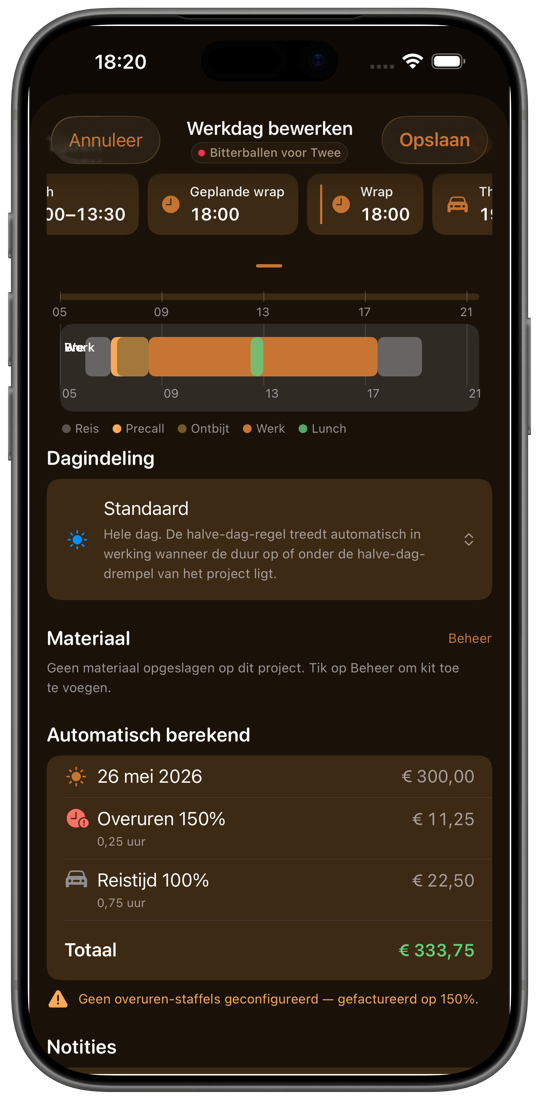
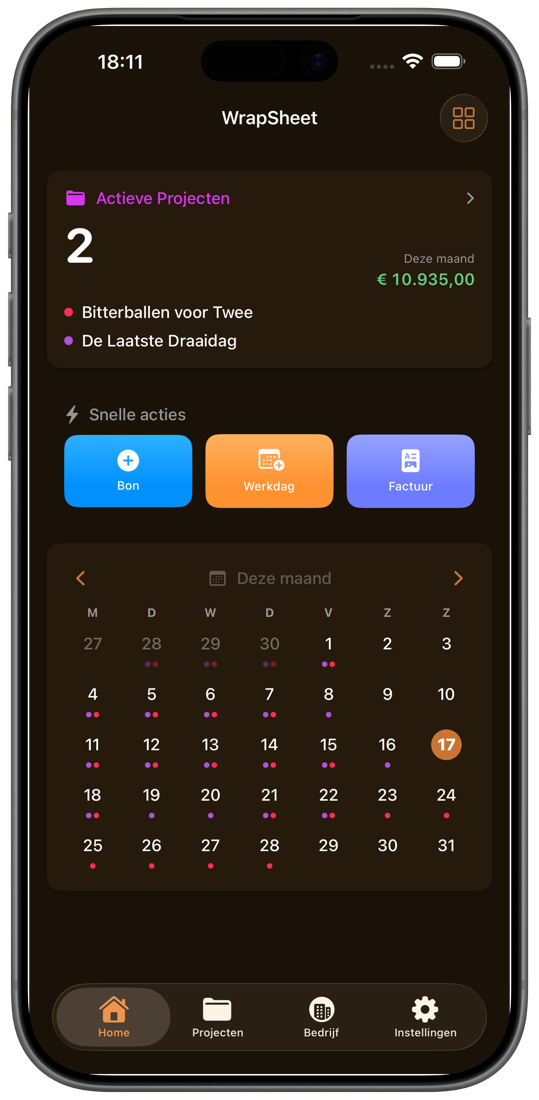
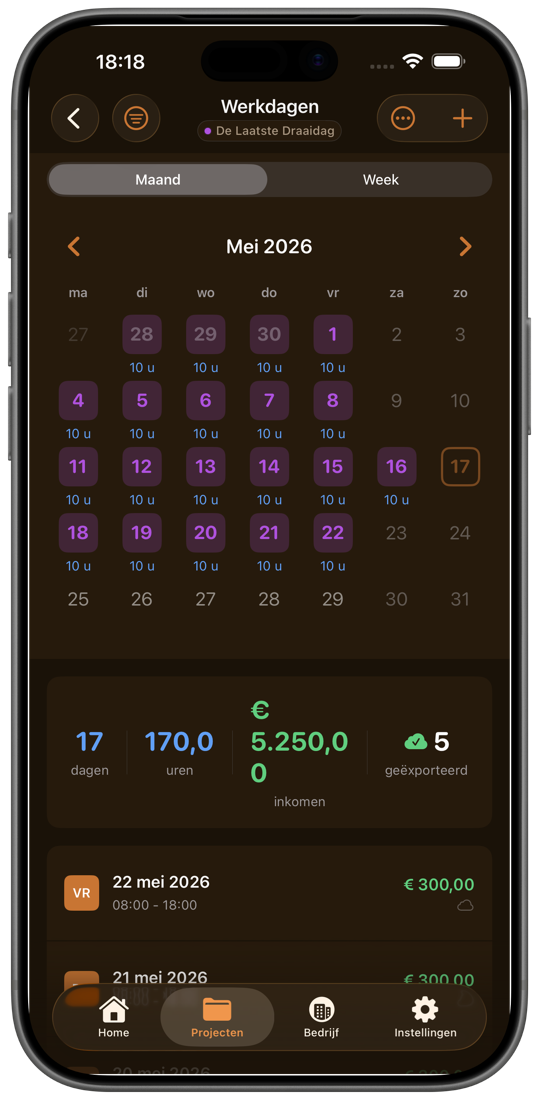
De maandagenda toont elke draaidag met uren en chips. Open er één en zie de tijdlijn, materiaal en automatisch berekende overuren — exporteerbaar als XLSX of PDF zonder de flow te verlaten. The month view shows every shoot day with hours and chips. Tap one to see the timeline, equipment, and auto-calculated overtime — exportable as XLSX or PDF without leaving the flow.

  • Maand-, week- en agendaweergaveMonth, week, and agenda view
  • Overuren, reistijd en toeslagen automatischAuto overtime, travel, and uplifts
  • Draaiplanning-PDF importeren in één keerImport an entire call-sheet PDF at once

Bonnen Receipts

Maak een foto.
Wij doen de rest.
Snap a photo.
We do the rest.

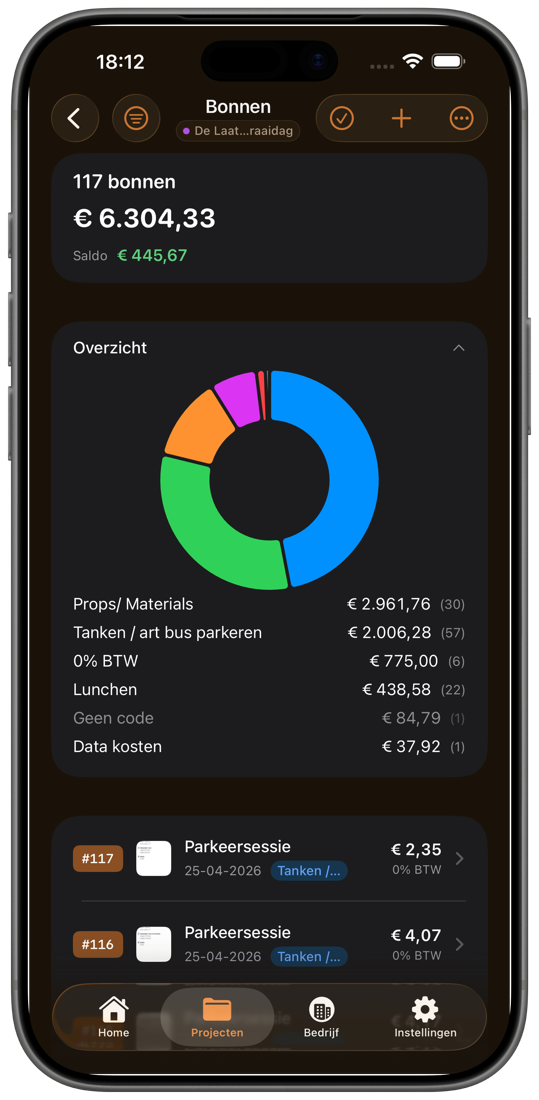
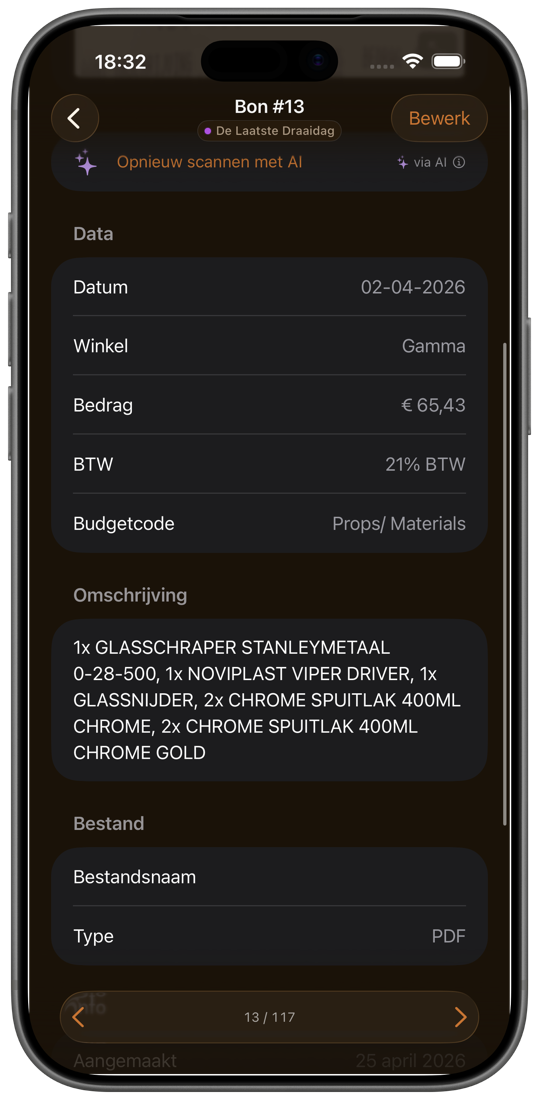
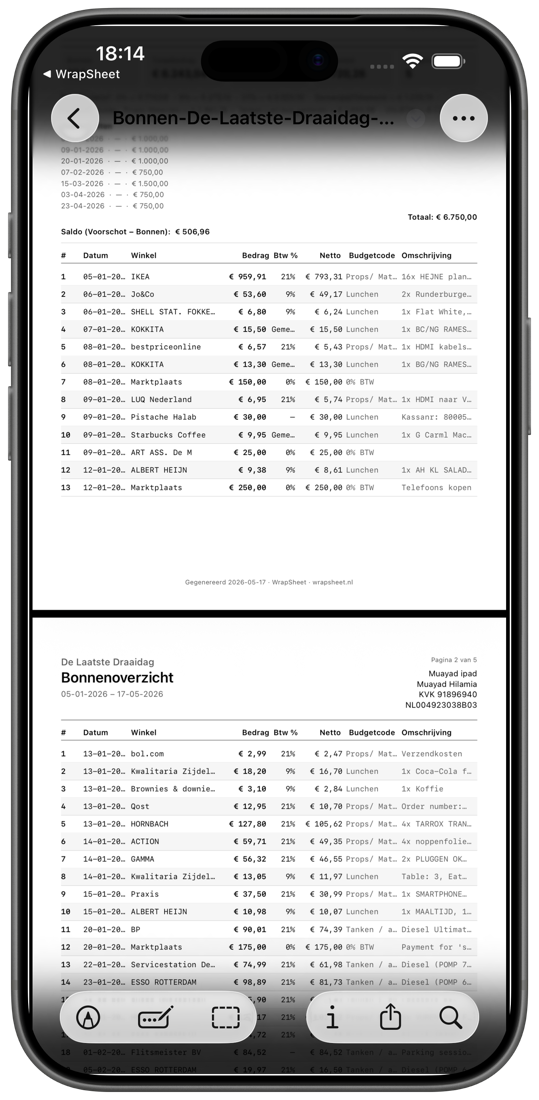
De Slimme Scanner leest datum, leverancier, totaal en BTW. Sorteer met budgetcodes en zie direct waar je geld heen gaat — eindafrekening in één PDF voor de productie. The Smart Scanner reads date, merchant, total, and VAT. Tag with budget codes and watch the chart break down spend in real time — wrap report goes out as one PDF.

  • AI-scan voor foto's en PDF-bonnenAI scan for photos and PDF receipts
  • BTW-tarieven 0%, 9% & 21% automatisch herkendVAT 0%, 9% & 21% detected automatically
  • Budgetcodes + live doughnut-chart per productieBudget codes + live doughnut chart per production

Facturen Invoices

Belastingdienst-klaar.
In één tik.
Belastingdienst-ready.
In one tap.

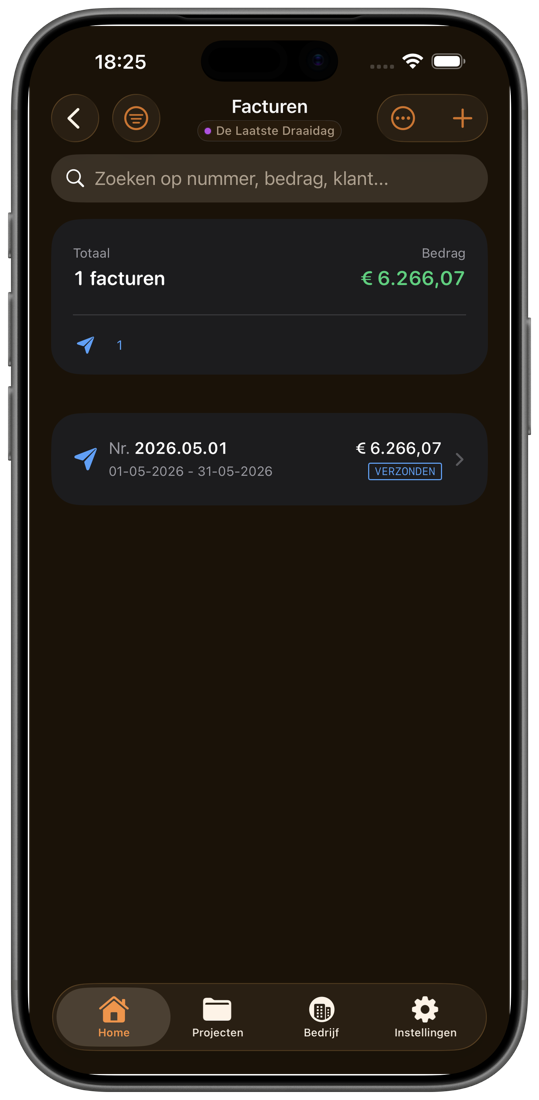
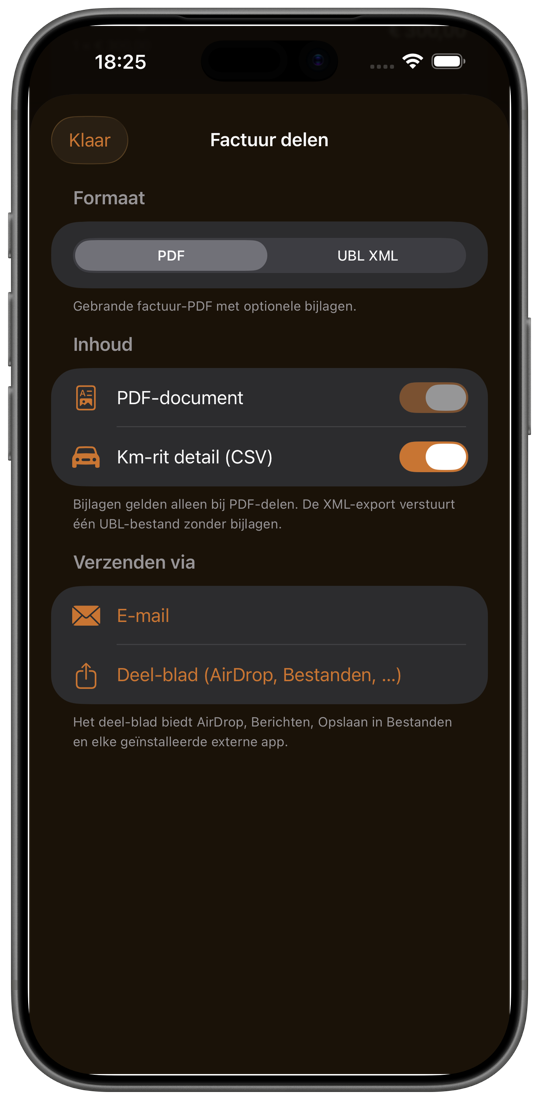
Werkdagen, kilometers en bonnen worden automatisch factuurregels. Verstuur per e-mail of deel als UBL e-factuur — alles vanuit de app, met je eigen huisstijl. Work days, mileage, and receipts become line items automatically. Send by email or share as a UBL e-invoice — straight from the app, with your own branding.

  • Eén tik: werkdagen + km + bonnen → factuurOne tap: work days + KM + receipts → invoice
  • PDF, UBL e-factuur, CSV-bijlagePDF, UBL e-invoice, CSV attachment
  • Nederlandstalige PDF voor KVK + BelastingdienstDutch-language PDF for KVK + Belastingdienst

Voorwaarden Voorwaarden

Jouw regels.
Automatisch toegepast.
Your rules.
Applied automatically.

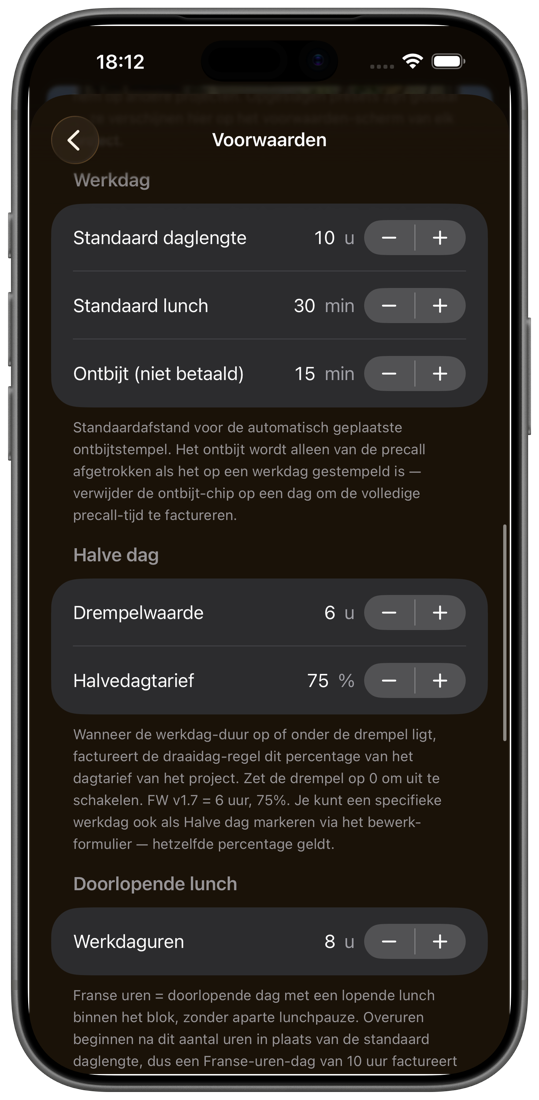
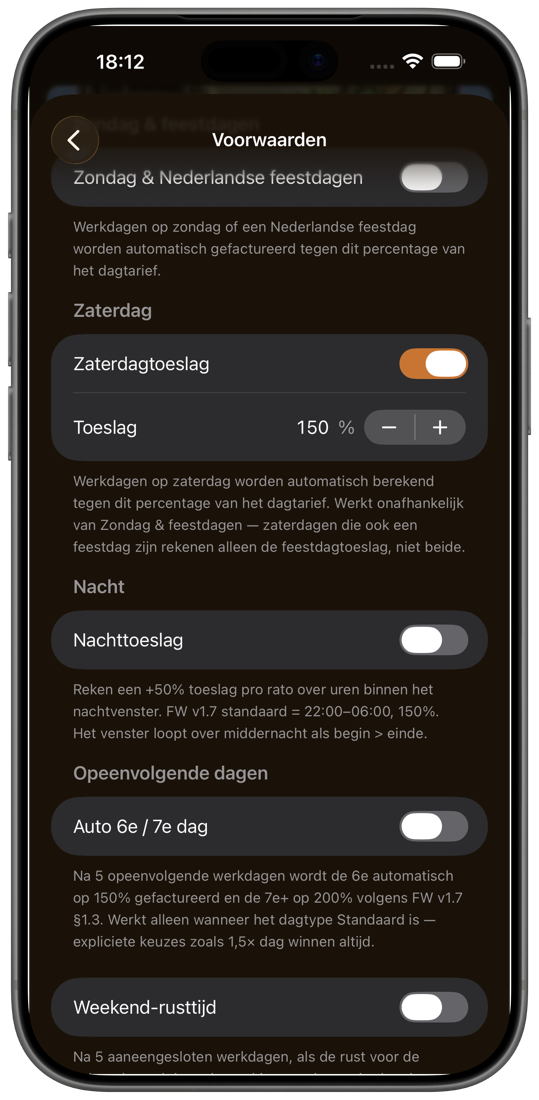
Stel halve-dag-drempels, weekend- en nachttoeslagen één keer in. WrapSheet rekent ze op elke werkdag toe — met presets voor commerciële producties en drama, plus eigen regels per project. Set half-day thresholds, weekend and night surcharges once. WrapSheet applies them to every workday — with presets for commercial productions and drama, plus custom rules per project.

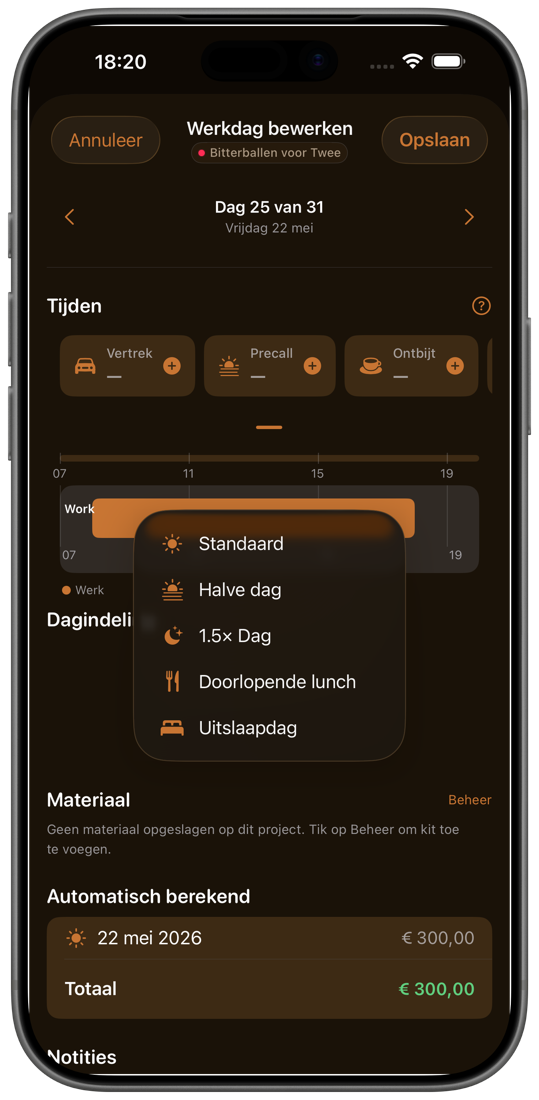
  • Halve dag, doorlopende lunch, 1,5× dagHalf-day, continuous lunch, 1.5× day
  • Zaterdag-, zondag- en nachttoeslagSaturday, Sunday, and night surcharge
  • Branche-presets + eigen aanpassingen per projectIndustry presets + custom tweaks per project

Bedrijf & ritten Business & mileage

Je hele bedrijf.
Op één scherm.
Your whole business.
On one screen.

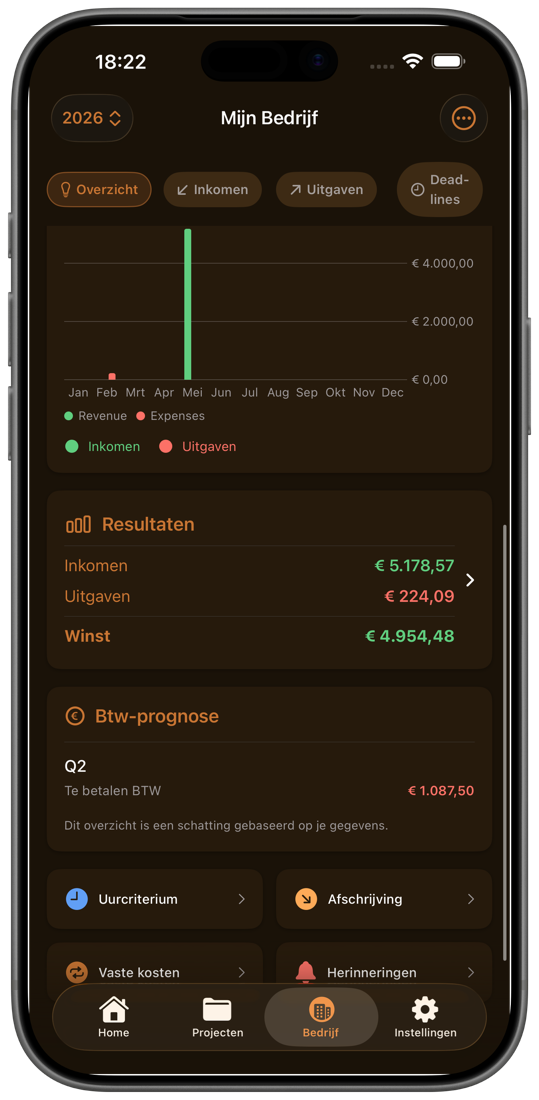
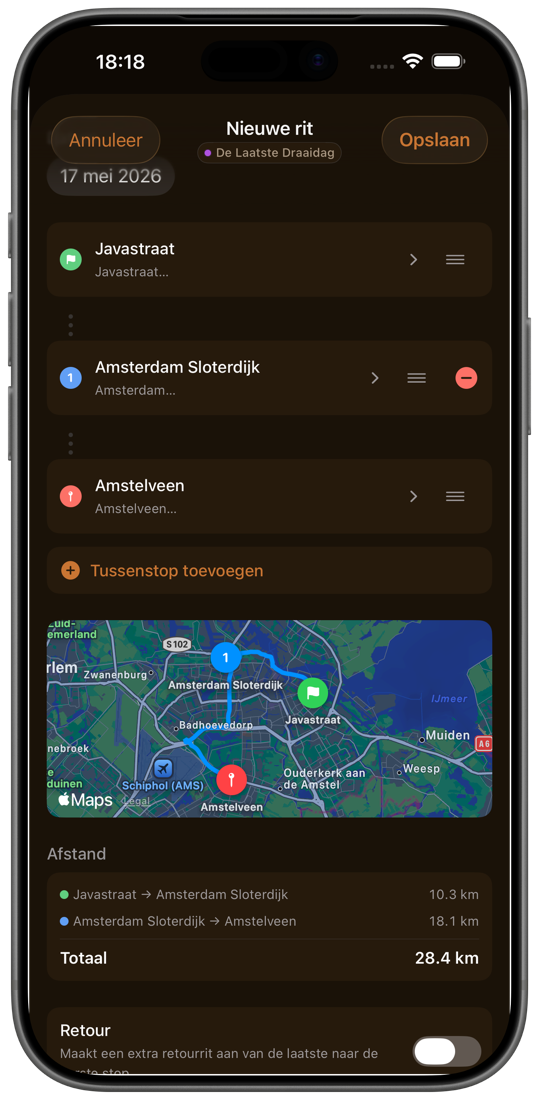
Maandelijkse omzet en kosten, BTW per kwartaal, aftrekposten op een rij. Eén scherm — en je weet waar je staat. Monthly revenue and costs, VAT by quarter, deductions in one list. One screen — and you know where you stand.

  • BTW-prognose en aftrekposten (Zelfstandigenaftrek, KIA)VAT forecast and deductions (Zelfstandigenaftrek, KIA)
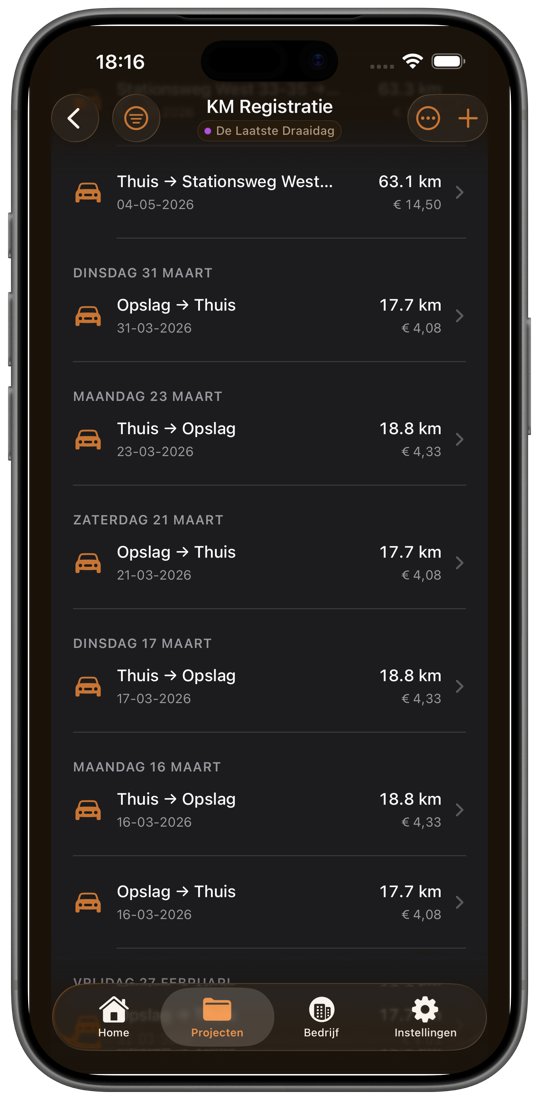
  • GPS-ritten met meerdere stops en retourGPS trips with multiple stops and return
  • Eigen km-tarief, hoger voor zware ladingCustom KM rate, higher for heavy loads

Op iPad On iPad

Op iPad wordt het
je productie-bureau.
On iPad, it becomes
your production desk.

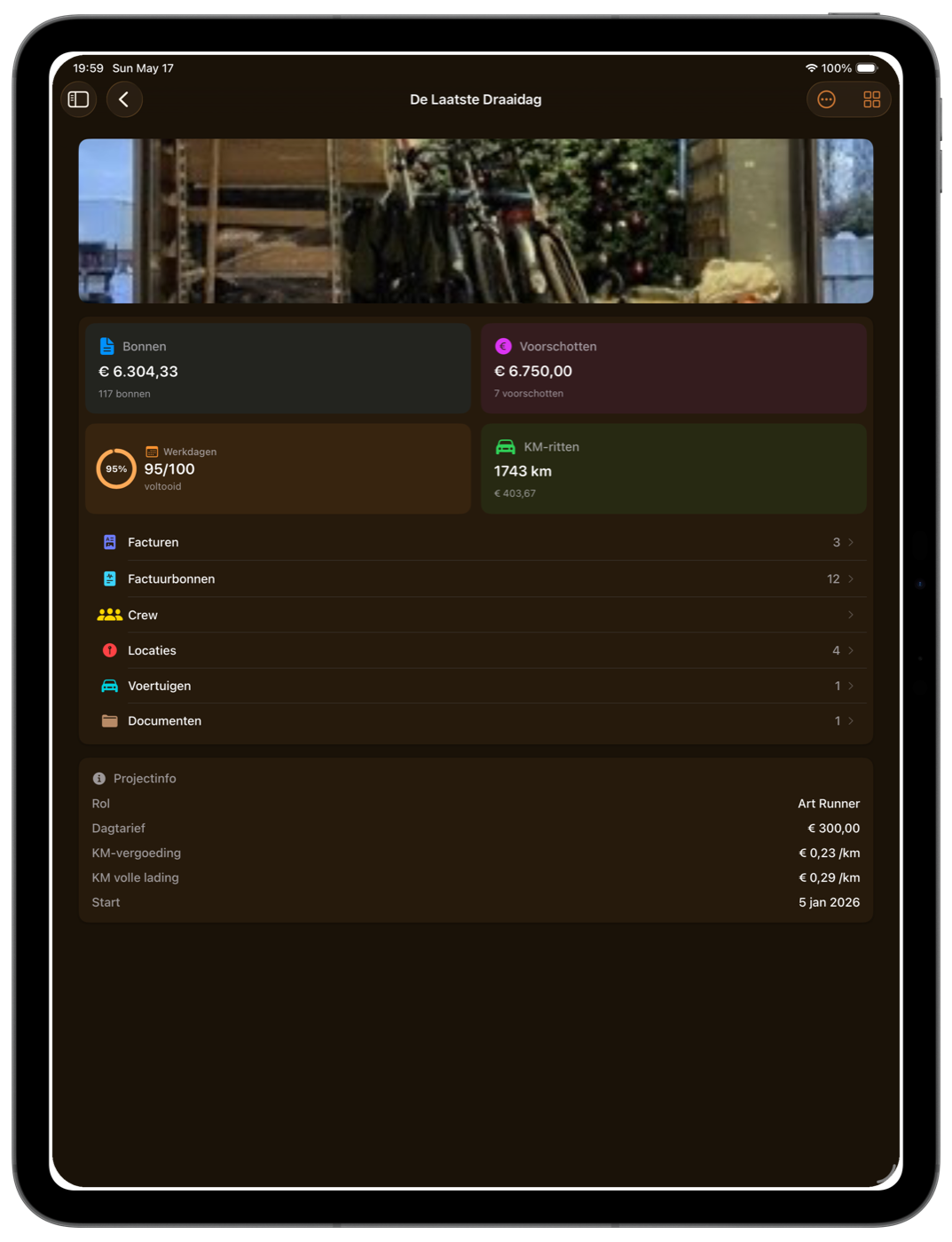
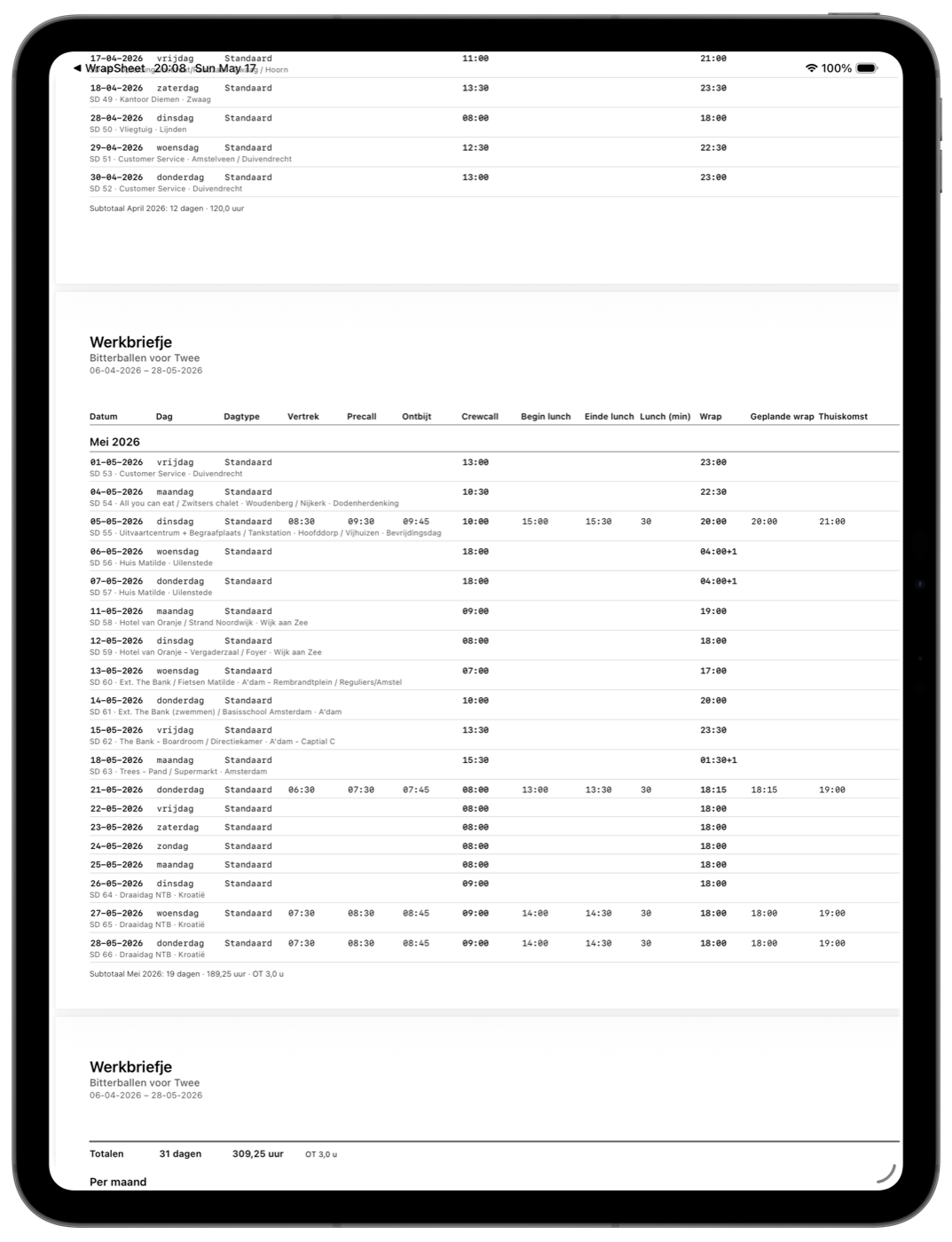
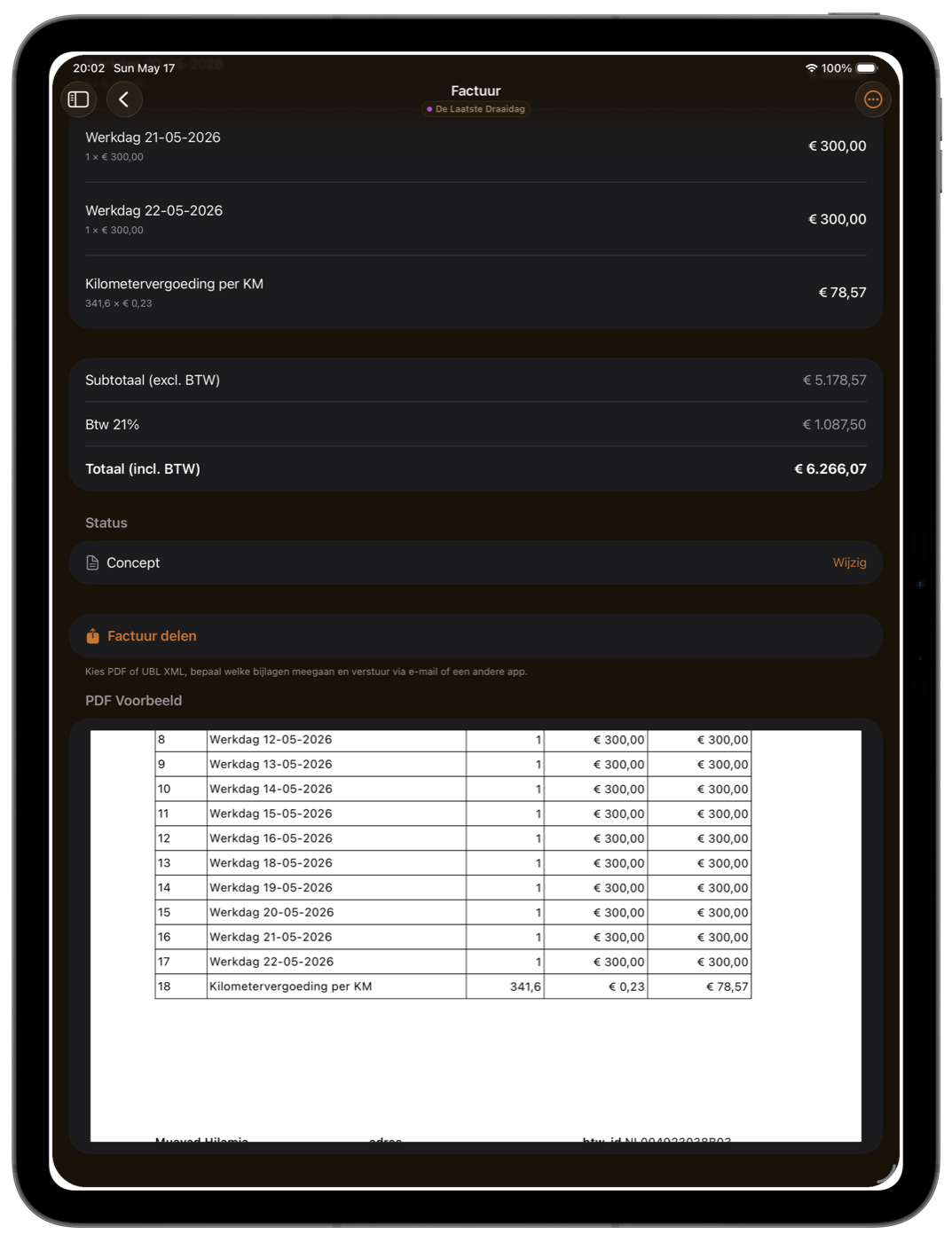
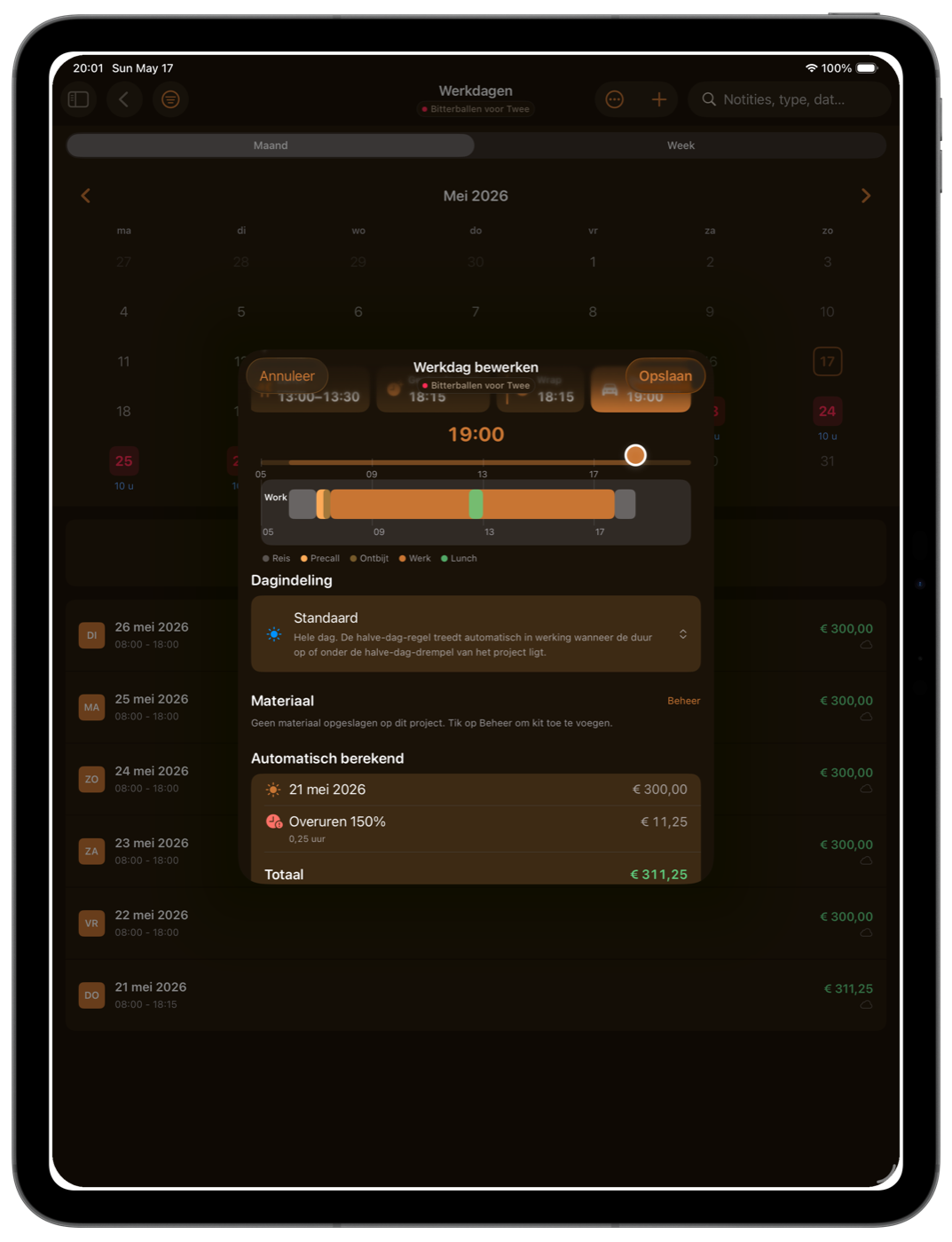
Meer scherm betekent een volledig dashboard, het Werkbriefje als één tabel, en facturen met live PDF-voorbeeld — allemaal naast elkaar zonder te switchen. More screen means a full dashboard, the Werkbriefje as one wide table, and invoices with a live PDF preview — all side-by-side without switching screens.

  • Sidebar-navigatie + Split View & Stage ManagerSidebar navigation + Split View & Stage Manager
  • Werkdag bewerken zonder de agenda te verlatenEdit a workday without leaving the calendar
  • Volledige PDF-voorbeelden in de app — geen externe viewerFull PDF previews inside the app — no external viewer
WrapSheet op iPad — project-dashboard
Werkbriefje als één tabel Werkbriefje as one table
Factuur met live PDF-voorbeeld Invoice with live PDF preview
Werkdag bewerken naast de agenda Edit a workday next to the calendar

Op Mac On Mac

Op Mac werkt het
als een Mac-app hoort te werken.
On Mac, it works
like a Mac app should.

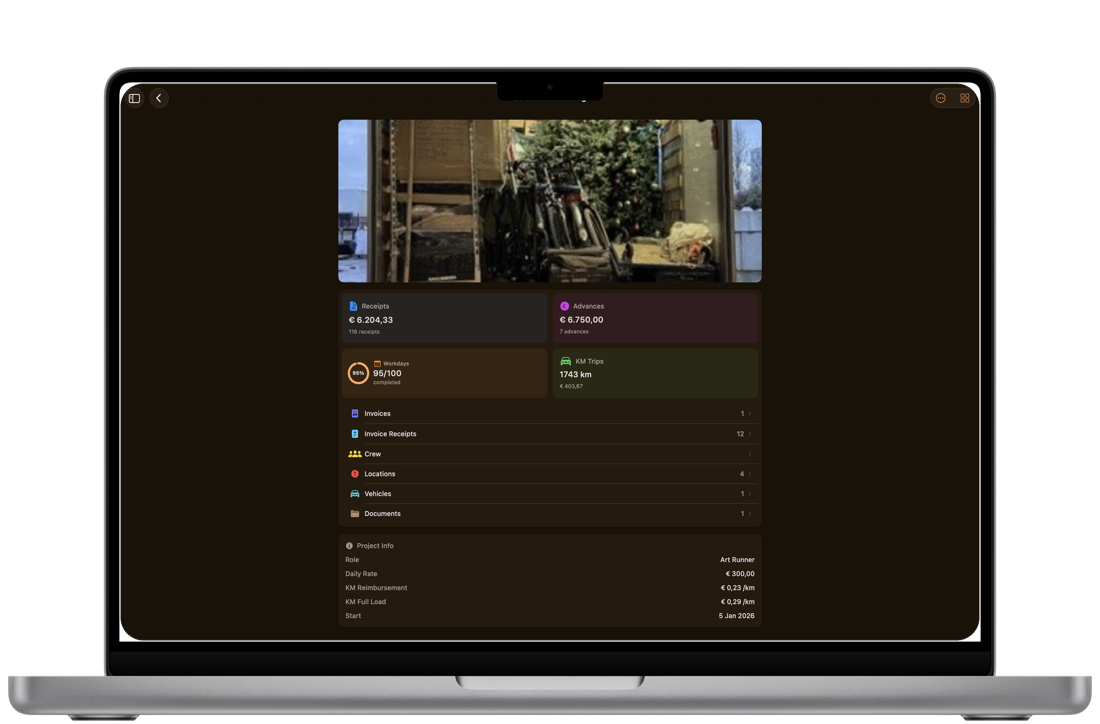
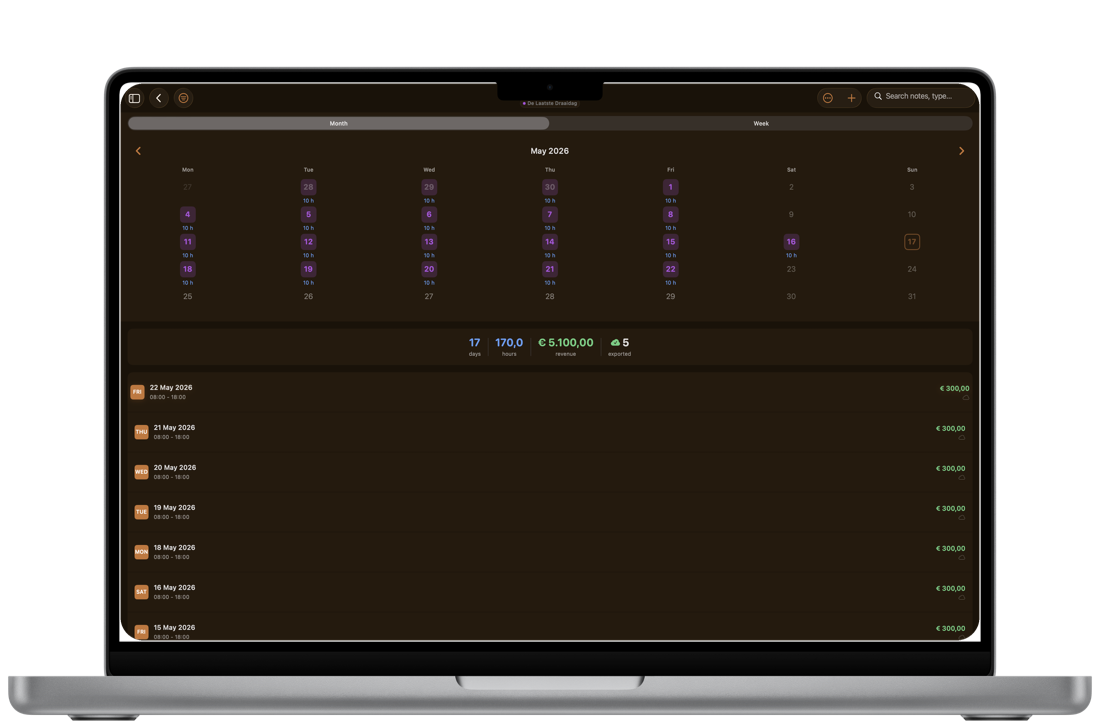
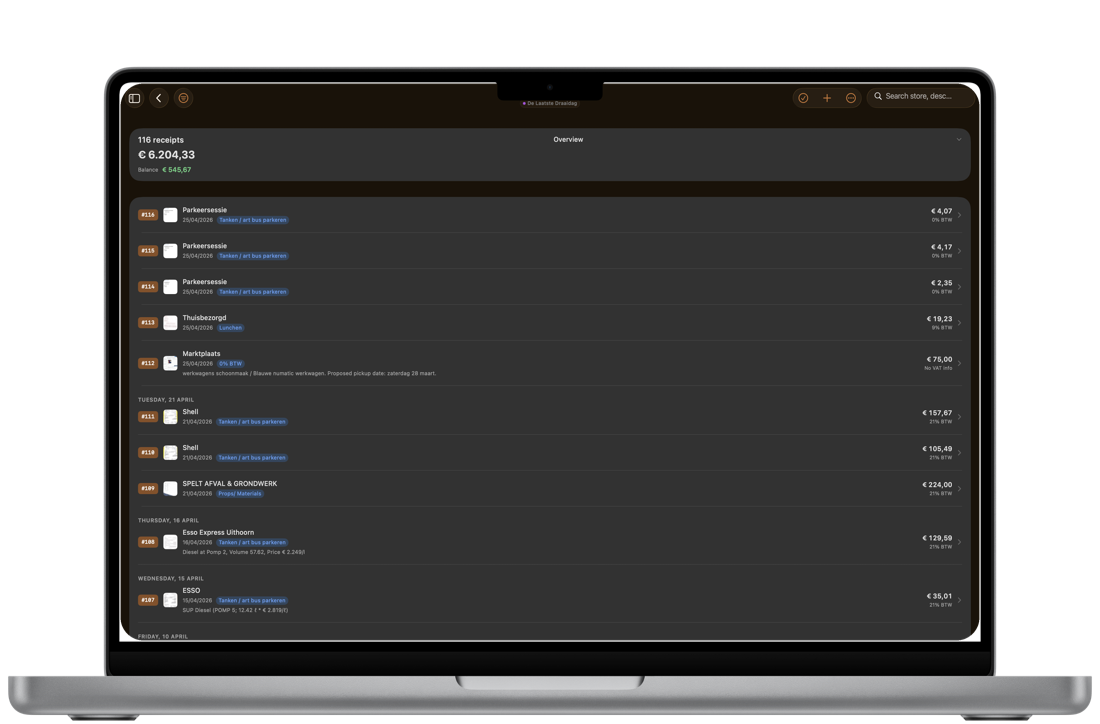
Volledige sidebar, hele maand werkdagen in één lijst, en al je bonnen in één scrolweergave. Toetsenbord-shortcuts, menu-balk en Finder-export waar je ze verwacht. Full sidebar, a whole month of workdays in one list, and every receipt in one scroll. Keyboard shortcuts, menu bar, and Finder export right where you expect them.

  • Native Mac-app via Mac Catalyst — geen browser-tabbladNative Mac app via Mac Catalyst — no browser tab
  • Bestanden & Voorvertoning voor PDF's en exportsFinder & Quick Look for PDFs and exports
  • Werkt op elke Mac met Apple Silicon — M1 of nieuwerRuns on any Apple Silicon Mac — M1 or newer
WrapSheet op Mac — home met sidebar en agenda
Maand & lijst naast elkaar Month & list side-by-side
Project-dashboard op groot scherm Project dashboard on a big screen
Alle bonnen, één scroll Every receipt, one scroll

Nog meer schermen More screens

Elk hoekje is even zorgvuldig gemaakt. Every corner is built with the same care.

Home + agendaHome + calendar
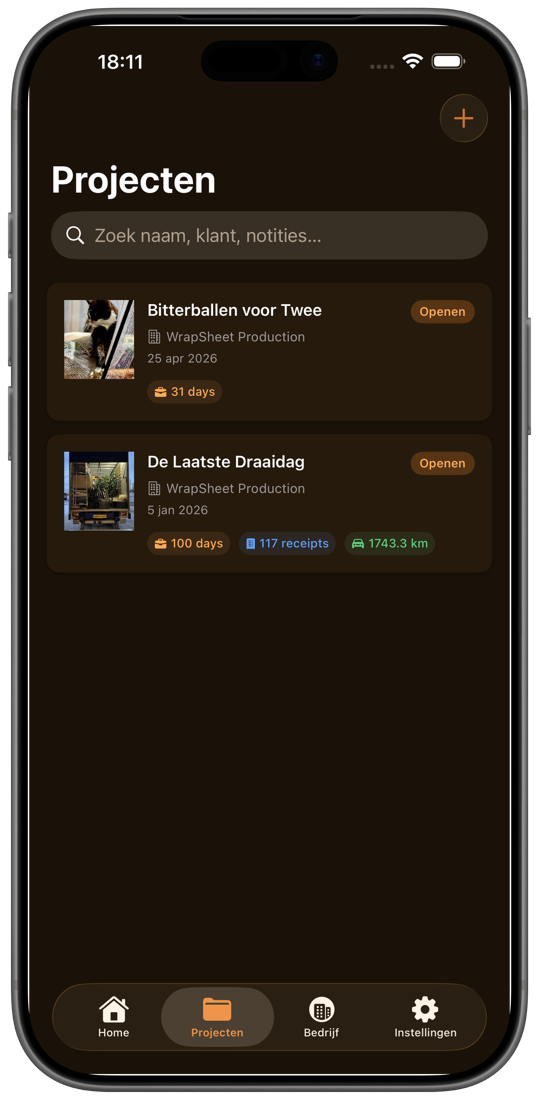
ProjectenProjects
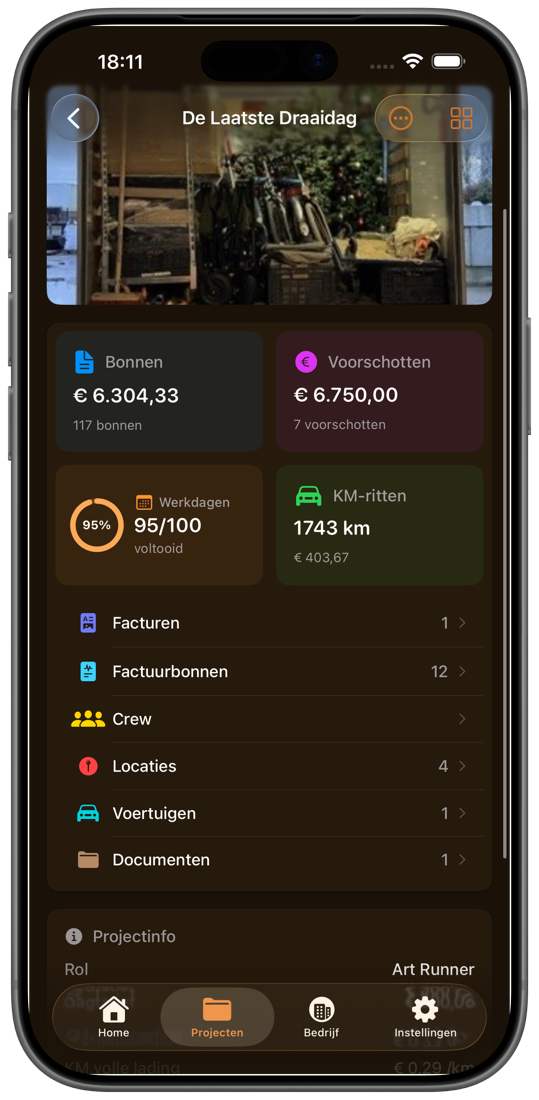
Project-detailProject detail
Dagindeling kiezenDay-shape picker
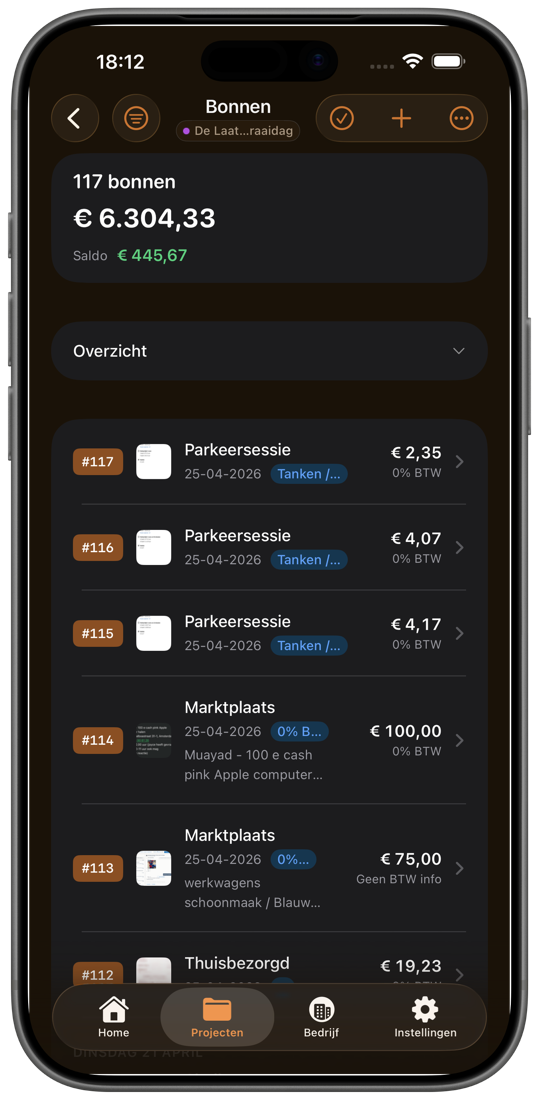
Bonnen-lijstReceipts list
Bonnen-PDF voor productieReceipts PDF for production
KM-registratieMileage log
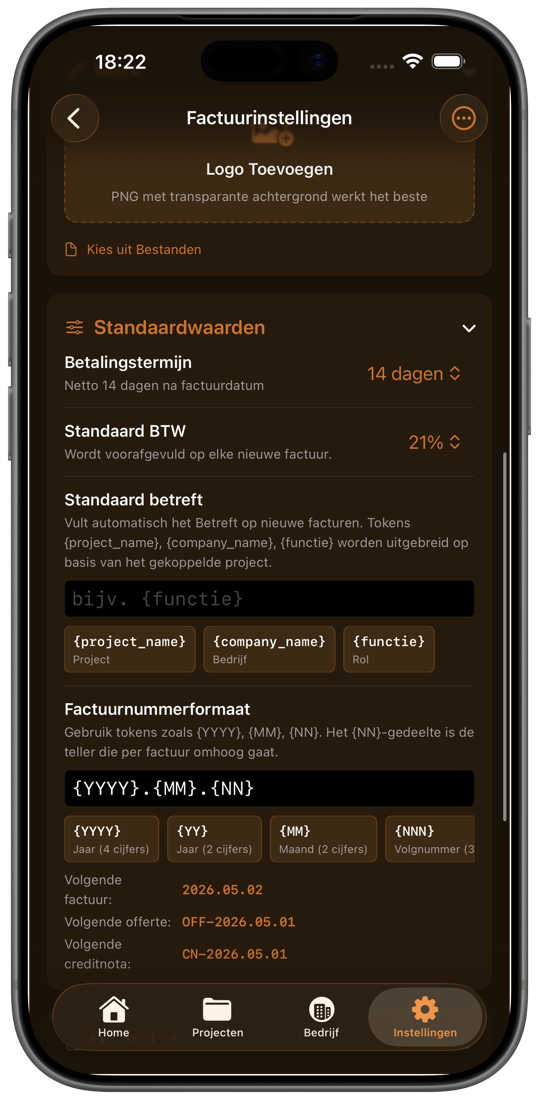
Factuur-instellingenInvoice settings

Zo werkt het How it works

Van eerste draaidag tot eindfactuur. From first shoot day to final invoice.

01

Voeg de productie toe Add the production

Maak een project aan, kies een voorwaarden-preset of vul je eigen tarieven in. Sleep eventueel de draaiplanning erin om werkdagen vooruit te laten invullen. Create a project, pick a voorwaarden preset or fill in your own rates. Optionally drop in the draaiplanning to pre-fill werkdagen.

02

Leg de dag vast tijdens de productie Capture as you go

Werkdagen tikken, bonnen scannen, kilometers automatisch via GPS. De voorwaarden-engine rekent overuren, weekend en nachttoeslag op de achtergrond uit. Tap in work days, scan receipts, log mileage automatically via GPS. The voorwaarden engine calculates overtime, weekend, and night surcharges in the background.

03

Factureer met één tik Invoice in one tap

WrapSheet bundelt werkdagen, kilometers en bonnen tot één Nederlandse factuur met btw en UBL e-factuur-export. Klaar voor de Belastingdienst en je productiehuis. WrapSheet bundles work days, mileage, and receipts into one Dutch-compliant invoice with VAT and UBL e-invoice export. Ready for Belastingdienst and your producer.

Prijs Pricing

Een maand gratis. Daarna € 7,99 per maand. One month free. Then € 7.99 a month.

De basis is gratis. Een abonnement ontgrendelt AI-scan, onbeperkt facturen en onbeperkt exporteren. The basics are free. A subscription unlocks AI scanning, unlimited invoices, and unlimited exports.

Maandelijks Monthly

Opzegbaar wanneer je wilt Cancel any time
€ 7,99 / maand / month

Eerste maand gratis, daarna automatisch verlengd. Opzegbaar in de App Store. First month free, then auto-renews. Cancel any time in the App Store.

Binnenkort beschikbaar Coming soon
Onbeperkte projecten en items Unlimited projects and entries
Gratis: 1 project, 10 bonnen / werkdagen / km-ritten / voorschotten Free: 1 project, 10 receipts / work days / KM trips / advances
AI-bonscan AI receipt scanning
500 scans / maand. Niet beschikbaar in de gratis versie. 500 scans / month. Not available in the free version.
Draaiplanning-PDF importeren Draaiplanning PDF import
Een hele maand werkdagen automatisch ingevuld. Niet beschikbaar in de gratis versie. A whole month of work days filled in automatically. Not available in the free version.
Onbeperkte facturen + exports Unlimited invoices + exports
PDF, CSV, UBL e-factuur. Gratis: 1 factuur + 1 export per kalendermaand. PDF, CSV, UBL e-invoice. Free: 1 invoice + 1 export per calendar month.
Wrap Book PDF Wrap Book PDF
Het volledige eind-rapport van een productie in één Nederlandstalig PDF. The full end-of-production report bundled as one Dutch-language PDF.
Je data is altijd van jou Your data is always yours
Stop met abonneren? Je behoudt toegang tot alle eerder ingevoerde data en kunt deze maandelijks exporteren. Cancel anytime — you keep read-access to all data you've entered and can export it monthly.

Veelgestelde vragen FAQ

Wat je waarschijnlijk wilt weten. What you probably want to know.

Waar wordt mijn data opgeslagen? Where is my data stored?
Lokaal op je toestel. Projecten, bonnen, werkdagen, kilometers, facturen — alles staat op je iPhone, iPad of Mac. iCloud-back-up en herstel zit erin, maar zet jij aan/uit. Geen tracking, geen analytics, geen ad-netwerken. Alleen abonnees hebben een account: dan staan op onze server jouw e-mail (of een Apple-proxy-adres), je abonnementsstatus en een teller voor je AI-scans — geen administratie-inhoud. Bonnen en draaiplanningen die je naar de Slimme Scanner stuurt gaan in real time naar Google Gemini en worden daarna verwijderd. Alle details staan in het privacybeleid. Locally on your device. Projects, receipts, work days, mileage, invoices — all of it stays on your iPhone, iPad or Mac. iCloud backup and restore is built in, but you control when. No tracking, no analytics, no ad networks. Only subscribers have an account: in that case our server stores your email (or an Apple proxy address), your subscription status and a counter for your AI scans — no admin content. Receipts and call-sheets you submit to the Smart Scanner go to Google Gemini in real time and are then discarded. Full details in the privacy policy.
Kan ik mijn data exporteren? Can I export my data?
Ja. Werkdagen, bonnen en kilometers kun je exporteren naar Excel (XLSX), CSV en PDF. Facturen ook als UBL e-factuur. Yes. Work days, receipts, and mileage can be exported to Excel (XLSX), CSV, and PDF. Invoices also ship as UBL e-invoices.
Wat als ik wil opzeggen? What if I want to cancel?
Opzeggen kan op elk moment via Instellingen → Abonnementen in de App Store. Geen vragen, geen bevestigingsmail. Je behoudt lees-toegang tot al je eerder ingevoerde data en kunt deze nog steeds maandelijks exporteren. Cancel any time via Settings → Subscriptions in the App Store. No questions, no confirmation email. You keep read-access to all data you've entered and can still export it monthly.
Werkt het offline? Does it work offline?
Alles behalve AI-bonscan werkt volledig offline — werkdagen tikken, voorwaarden uitrekenen, facturen genereren, kilometers loggen. AI-scan stuurt het bon-fotootje naar Gemini en heeft dus wel internet nodig. Op locatie zonder bereik kun je later scannen. Everything except AI receipt scanning works fully offline — logging work days, calculating voorwaarden, generating invoices, tracking mileage. AI scan sends the receipt image to Gemini so it needs internet. On location without signal, you can scan later.
Synct het tussen mijn iPhone, iPad en Mac? Does it sync between my iPhone, iPad and Mac?
Via iCloud-back-up/herstel: maak een back-up op het ene toestel, herstel op het andere. Jouw data gaat zo nooit door servers van ons heen. Via iCloud backup/restore: back up on one device, restore on the other. Your data never passes through our servers.
Is het Belastingdienst-compliant? Is it Belastingdienst-compliant?
Facturen voldoen aan de Nederlandse btw-regels: doorlopende nummering, KvK + btw-nummer, juiste btw-tarieven (9%, 21%, verlegd, vrijgesteld), klantgegevens. Wrap-book en bonnen-PDF zijn formats die productiehuizen accepteren. Voor aftrekposten (Zelfstandigenaftrek, Startersaftrek, MKB-vrijstelling, KIA) zit er een kwartaal-overzicht in dat één-op-één in je aangifte past. Invoices follow Dutch VAT rules: sequential numbering, KvK + VAT number, correct VAT rates (9%, 21%, reverse-charge, exempt), client info. Wrap-book and receipts-PDF are formats Dutch production companies accept. For deductions (Zelfstandigenaftrek, Startersaftrek, MKB-vrijstelling, KIA) there's a quarterly overview that maps directly to your tax return.
Krijg ik geld terug als het niks voor mij is? Can I get a refund if it's not for me?
De eerste maand is sowieso gratis — zo kun je het rustig uitproberen op een echte productie. Daarna gaan refunds via Apple (Report a Problem in de App Store). Apple is meestal coulant binnen 14 dagen. The first month is free anyway — try it on a real production. After that, refunds go through Apple (Report a Problem in the App Store). Apple is usually lenient within 14 days.
Wie maakt dit? Who makes this?
Muayad Hilamia — werkt zelf in de Nederlandse filmindustrie. Iedere feature is ontstaan uit een echte productiedag waar Excel of papier de spullen kwijtraakte. Geen VC, geen team van 40, geen growth-hacks. Vragen? hello@wrapsheet.nl. Muayad Hilamia — works in the Dutch film industry. Every feature came from a real production day where Excel or paper lost the data. No VC, no team of 40, no growth-hacks. Questions? hello@wrapsheet.nl.

Contact Get in touch

Vragen? Op de hoogte blijven? Questions? Want to stay updated?

Stuur me een mailtje. Ik antwoord meestal binnen een paar dagen — vaak sneller. Drop me a line. I usually reply within a few days — often quicker.

hello@wrapsheet.nl